


 1 (760) 224-9616
Last Updated: October 28, 2026
Quick Summary
The best smart home devices for families keep working when the Wi-Fi drops, the power cuts out, or a toddler presses every button in reach. We judged every device on whether it survives a power cut, needs an app to work, and costs more to run than to buy. Devices that fail during an outage got cut, no matter how good the demo looked.
- The Wireless Camera Power Failure Endurance WiFi Version has a built-in rechargeable lithium battery and is for indoor use only.
- The Solar Stair Lamp 6LED has six LED chips, a 600mAh NiMH battery, and a listed lighting time of about eight hours.
- The Ultrasonic Pest Repeller plugs into the mains, covers up to 1600 square feet, and needs one unit per room.
- Start family security with one indoor camera on the main entry path, then add a hallway motion sensor.
- Skip outdoor cameras with subscription-only cloud recording if you want outage resilience.
Table of Contents
- 9 Best Smart Home Devices for Families in 2026: Quick Comparison
- How We Chose These Smart Home Devices for Families
- 1. Wireless Camera Power Failure Endurance WiFi Version: Backup Power for Real Emergencies
- 2. Solar Stair Lamp Garden Courtyard Corner 6LED: Zero-Wiring Safety Lighting
- 3. Direct Selling Ultrasonic Electronic Mosquito Killer: Chemical-Free Pest Control for Kids and Pets
- Smart Home Security Devices for Families: Cameras, Sensors, and Entry
- Smart Home Devices for Kids: Voice Control and Age-Appropriate Access
- Smart Home Devices That Work Together: Compatibility and Local Control
- Smart Home Devices for Energy Savings: Where the Real Savings Come From
- Privacy, Child Safety, and Total Cost of Ownership
- Where to Buy Smart Home Devices for Families
- Frequently Asked Questions
9 Best Smart Home Devices for Families in 2026: Quick Comparison
The best smart home devices for families are the ones that keep working when the Wi-Fi drops, the power cuts out, or a toddler presses every button in reach. Below, we'll show you three devices for a family home, and how the wider smart home devices category fits around them.
| Device | Price | Power Source | Best For | Watch Out For |
|---|---|---|---|---|
| Wireless Camera Power Failure Endurance WiFi | $15.96 | Built-in rechargeable lithium battery | Indoor use | Indoor use only |
| Solar Stair Lamp 6LED | $16.58 | Solar panel + 600mAh battery | Paths, stairs, garden corners | Solar-powered |
| Ultrasonic Pest Repeller | $22.14 | Mains plug | Chemical-free pest control | One unit per room |
How We Chose These Smart Home Devices for Families
We judged every device on three things a family actually feels: does it survive a power cut, does it need an app to work, and does it cost more to run than to buy. A common mistake is buying the flashiest hub first and the boring safety gear last. We did the opposite. Devices that fail during an outage got cut, no matter how good the demo looked.
1. Wireless Camera Power Failure Endurance WiFi Version: Backup Power for Real Emergencies
The Wireless Camera Power Failure Endurance WiFi Version has a built-in rechargeable lithium battery. It's an indoor camera with fixed zoom, backlight compensation, a 1/1.3 sensor, and ABS material.
You can check the full spec and view the backup-power camera before you commit.

Skip if: you need outdoor weatherproofing.
2. Solar Stair Lamp Garden Courtyard Corner 6LED: Zero-Wiring Safety Lighting
The Solar Stair Lamp Garden Courtyard Corner 6LED has six LED chips, a 2V 130mA polycrystalline panel, and a 600mAh NiMH battery. Its listed lighting time is about eight hours. The listed materials are stainless steel and PC.
The listing gives installation locations as a garden, courtyard, aisle, or ladder, and lists main-switch and light-control induction modes. You can check the solar stair lamp details for light colour options.

3. Direct Selling Ultrasonic Electronic Mosquito Killer: Chemical-Free Pest Control for Kids and Pets
This plug-in unit emits ultrasonic waves to repel insects, mice, mosquitoes, ants, spiders, and cockroaches. The listing says humans and household pets cannot hear the ultrasound and describes the product as an alternative to chemicals, poisons, and traps.
The listing gives indoor coverage of up to 1600 square feet and says ultrasound cannot penetrate walls or solid objects, recommending one device in each room. It says results may take 2-3 weeks and lists a 90-day guarantee with a full refund if there is no effect. You can shop the ultrasonic mosquito killer.

Smart Home Security Devices for Families: Cameras, Sensors, and Entry
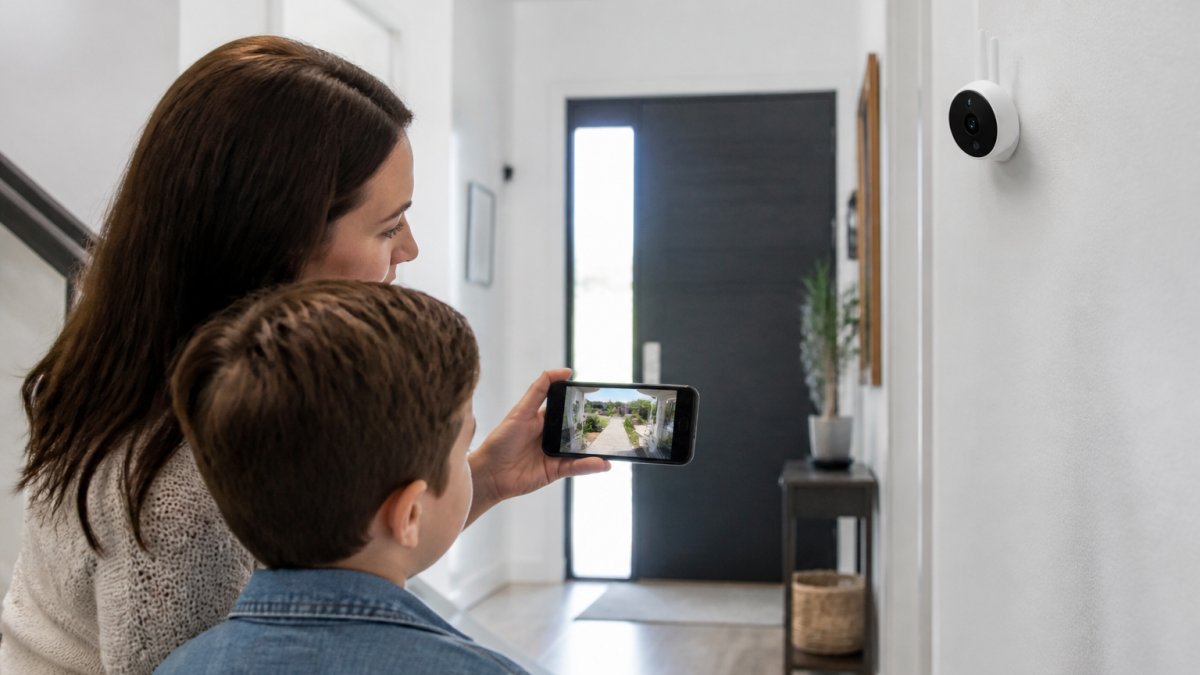
Security is the category families overbuy and under-plan. A camera you never check is decoration. Start with one indoor camera covering the main entry path, add a motion sensor to the hallway, and only then think about doorbells or keyless entry. The principle that matters: every security device should send a real-time alert you'd actually act on, and should still function on battery when mains power fails.
Cameras and video doorbells
For families, the most useful camera is not the highest-resolution one, it's the one that covers the path your kids actually use. A video doorbell that shows you who is at the door before you open it is a practical first purchase for families with school-age children who arrive home before a parent. Indoor cameras work best in shared spaces (hallway, kitchen, playroom) rather than bedrooms; if you do place one in a child's room, choose a model with a physical privacy shutter and never point it at the bed. Look for local storage (microSD or a home hub) as an option, because cloud-only cameras stop recording when the internet drops, a gap competitors rarely mention.
Sensors and entry
Door and window sensors are the cheapest way to add real security coverage: they alert you when a door opens, which matters for families with toddlers who learn to unlock doors, or teenagers who forget to close them. Motion sensors in hallways double as automation triggers (lights on at night) and as security alerts. Smart locks are the most family-specific entry device: they let you issue temporary codes for babysitters, cleaners, or visiting grandparents, and they log who came in and when. The trade-off is that many smart locks rely on cloud services for remote access, so check whether the lock still works with a key or keypad when Wi-Fi is down.
Privacy and child-safety controls
Security devices are where family privacy matters most. Change default passwords, enable two-factor authentication, and review who has access to each camera feed, many apps let you share a camera with a family member, and that sharing is easy to forget. Check the device's data retention policy: some brands keep recordings in the cloud by default, while others let you record locally. For child safety, disable two-way audio on cameras in children's spaces unless you actively use it, and set up activity zones so alerts only fire for the areas you care about. A camera that pings you every time a pet walks by gets muted within a week.
Direct Selling Ultrasonic Electronic Mosquito Killer Household Children'S →
What to skip
Skip outdoor cameras with subscription-only cloud recording if you want outage resilience, and skip any security device that requires a hub from a brand you don't already use. The goal is a small, reliable stack you actually check, not a wall of gadgets.
Smart Home Devices for Kids: Voice Control and Age-Appropriate Access
Most smart-home roundups treat kids as a footnote. That's a missed opportunity, because the devices that help most in a family home are the ones tied to routines: school mornings, bedtime, chores, and independent use by children and older relatives. This section maps devices to those routines and explains the access controls that make them safe.
Routines by age and household pattern
Multigenerational households: Voice control and smart locks are accessibility tools as much as convenience ones. A grandparent with limited mobility can unlock a door or turn on lights by voice, and a caregiver can be issued a temporary code. Smart lighting with motion sensors in hallways reduces the risk of falls at night. These use cases rarely appear in mainstream roundups, but they are often the strongest reason a family adopts a smart home.
Age-appropriate access controls
The practical controls are consistent across ecosystems: set up voice control on a shared family account, disable purchasing by voice, keep age-appropriate content filters on, and review which devices are shared with which family member. Smart displays often support child accounts with restricted content; use them. Keep any device with a camera out of bedrooms, and prefer speakers over displays in bedrooms where a screen would be a distraction.
What actually helps vs. what looks good in a demo
The devices that survive in a family home are the boring ones: a display that runs the morning routine, a lock with a keypad backup, lights on schedules, and a speaker that answers questions. For families tracking health alongside routines, the Smart Ring Health Tracker fits the same kids-and-family device theme. Colour-changing bulbs and novelty gadgets get old fast. Buy for the routine you want to fix, not for the demo.
Smart Home Devices That Work Together: Compatibility and Local Control
A simple test before purchase: can this device run its basic function without the internet? A smart plug that needs the cloud to switch a lamp is a weak link. One that stores schedules locally is not. For families comparing connected wearables, the Bluetooth calling smart watch is worth a look for its compatibility and calling features.
Smart Home Devices for Energy Savings: Where the Real Savings Come From
The honest version: savings are modest per device and compound across a house. Start with the appliances that run unattended, put them on schedules, and review the app data after a month. If a device doesn't show you its consumption, it isn't an energy tool, it's a remote control.
Privacy, Child Safety, and Total Cost of Ownership
On total cost of ownership, the sticker price is only the start. Add subscriptions for cloud recording, replacement batteries, and the time cost of managing multiple apps. Devices that work locally and store data on-device usually cost less over three years than cheap hardware with a monthly fee attached. That's the calculation most roundups skip.
Where to Buy Smart Home Devices for Families
onlinegotmine.com offers home improvement and electronics, free shipping on select items, multi-currency support for international shoppers, trending deals, coupon codes, and customer support via phone. Browse the trending deals and coupon codes.
Frequently Asked Questions
What smart home devices are most useful for families?
The catalog includes an indoor camera with a built-in rechargeable lithium battery and a solar step lamp listed for gardens, courtyards, aisles, and ladders. Check each product's listing for its specifications.
Are smart home devices safe for kids?
Safety depends on setup, not the device category. Keep cameras pointed at doors and common areas, not bedrooms or bathrooms, and set strong unique passwords with two-factor authentication where available. Use app-level controls to limit which devices children can command, and disable voice purchasing on speakers. For younger children, choose devices with physical switches and no small removable parts. Explain which devices are tools, not toys, and review privacy settings together as they get older.
Do smart home devices from different brands work together?
They can, but only when you check compatibility before buying. Look for devices that support Matter or a common ecosystem like Amazon Alexa, Google Home, or Apple Home. Many budget devices still rely on their own app and cloud service, which means no cross-brand automation. A practical approach is to pick one hub or voice assistant first, then buy devices that explicitly list support for it. Local control options reduce dependence on the cloud and keep routines working when the internet drops.
What smart home devices help families save energy?
The 6LED step lamp is solar-powered and lists a lighting time of about eight hours. See the product listing for its specifications.
What should families consider before buying smart home devices?
Check four things: compatibility with your existing hub or voice assistant, whether the device needs a subscription for alerts or storage, how it behaves during an internet or power outage, and the total cost over three years including batteries and subscriptions. Also confirm the return window and warranty, especially for budget devices. Families with multigenerational households should look for physical controls and large-button remotes so grandparents can use the system without a smartphone.
Building a family smart home that survives a power cut, a toddler, and a monthly budget is genuinely achievable, but only if you buy for reliability before novelty. Start with the backup-power camera, the solar stair lamp, and the ultrasonic repeller, then expand as your routines demand. Get started with onlinegotmine.com and shop smart home devices built for real family life.


